 zrsPOS
Pair a tablet
Pair a tablet at the counter with the zrsTaxFree app - a code from the admin, install the app from its link, open it from its icon and enter the code.
The zrsTaxFree app issues the forms. It is a web app: nothing to download from an app store, it installs from its link. Any Android tablet with Chrome, or an iPad with Safari, will do; it can be the tablet that runs Shopify POS.
Get a pairing code
- In Tax Free › Tablets, press Pair a tablet.
- Choose the Store: "The code works once, for 10 minutes." Only stores with a desk are offered.
- Press Get a pairing code for …. You get a QR code, its link and a 6-digit code with its countdown.
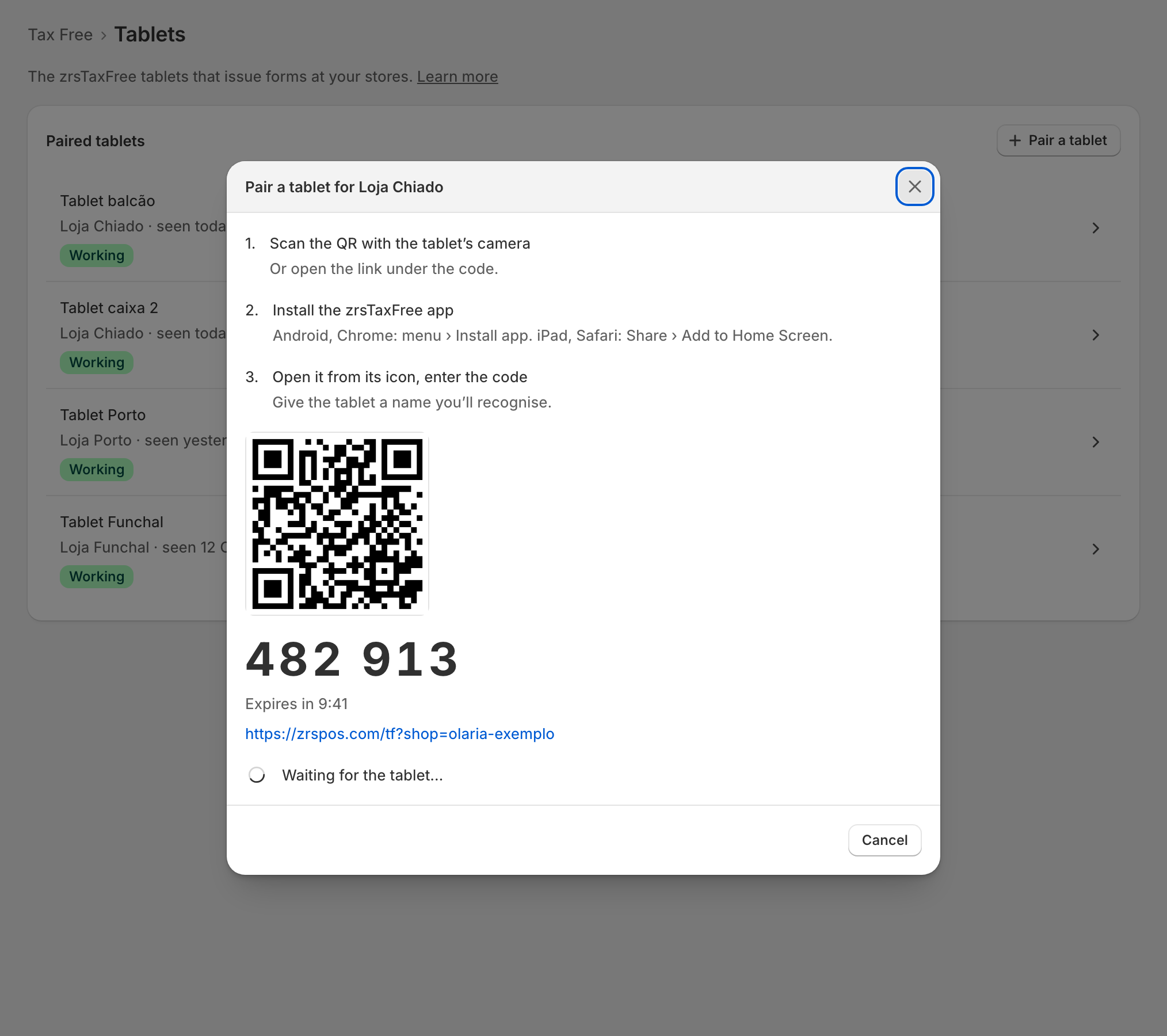
On the tablet
- "Scan the QR with the tablet’s camera". "Or open the link under the code."
- "Install the zrsTaxFree app". "Android, Chrome: menu › Install app. iPad, Safari: Share › Add to Home Screen."
- "Open it from its icon, enter the code". Type the 6-digit code, give the tablet a name you'll recognise, then tap Pair.
The admin shows "Paired: … · …" as soon as the tablet pairs. "It now shows in the list of paired tablets."
Then, on the tablet, open Settings (the ⚙︎ at the top) and choose the Printer for Tax Free forms, or leave Store default printer. Print a test form checks it.
Edge cases
- The code expired: press Get a new code for …. A code works once.
- Pair from the installed app, not from the browser tab: "Add the app to the home screen and pair from there — the pairing is kept by the installed app."
- The app opened without the link: "Shop missing — open this app from the link in the admin, under Tax Free › Tablets › Pair a tablet". Open the link from the admin's pairing window: the codes and the link come only from the admin, never from the till.
- "Invalid or expired code", "Too many failed attempts — wait 15 minutes": get a new code.
- "Tax Free is off: turn it on before you pair a tablet." "Tax Free is switched off for this shop" on the tablet is the same.
- "The SAGE codes aren’t set: Tax Free sales can’t be issued." Pairing waits for them; "The tablet couldn’t pair: the SAGE codes went missing meanwhile."
- "No store has a Global Blue desk yet: a tablet needs one." See Desks.
- A read-only plan: "pairing a tablet waits until it is in good standing again."
- Printing is off at your shop: the tablet says "Printing is handled outside zrsPOS. The Tax Free form is not printed here — print it from your own system."
- A Tax Free tablet is not a printer: it sends the form to one of your printers. See Choose how to print.