 zrsPOS
The Stores page
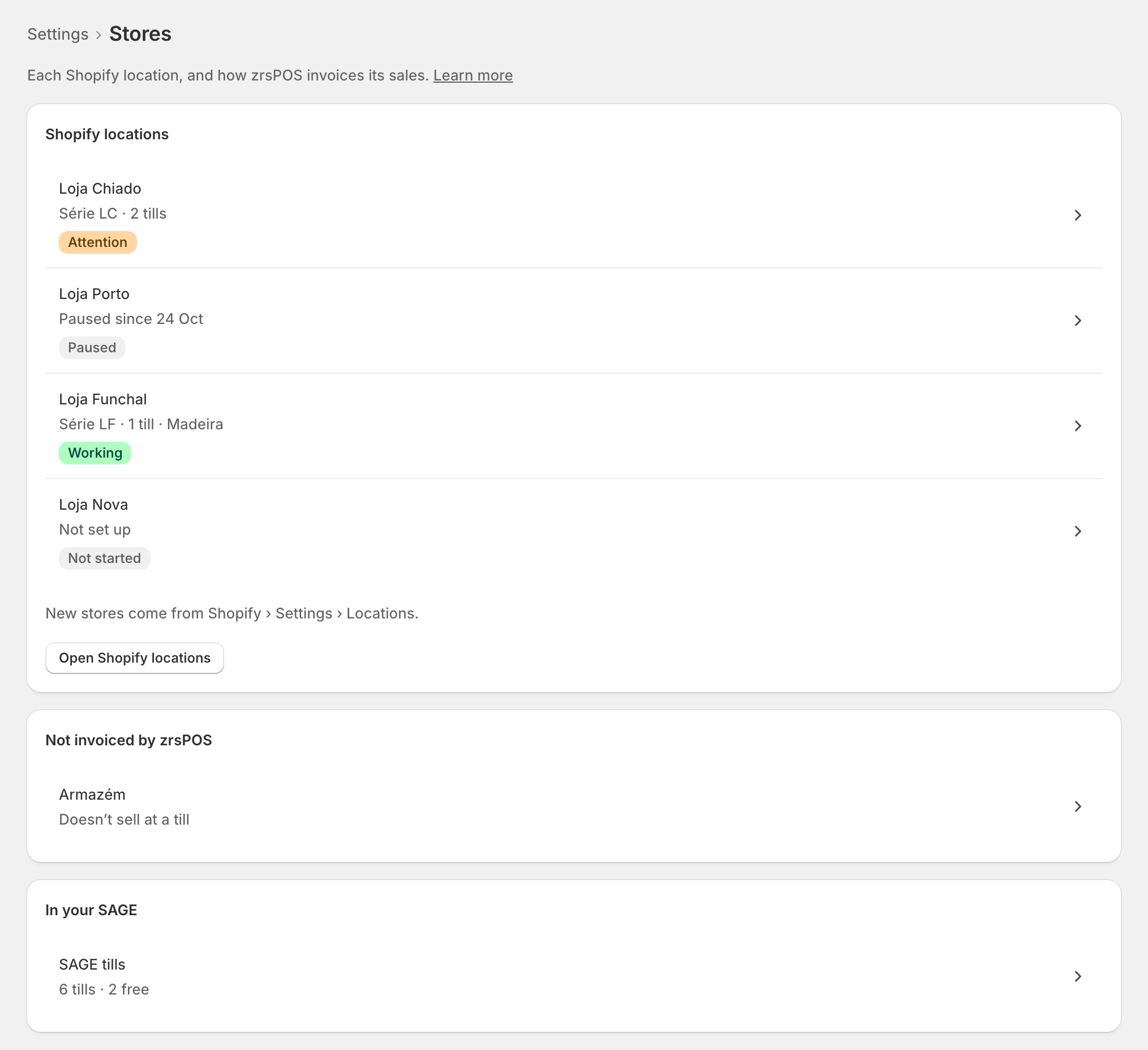
Settings › Stores lists every Shopify location as one store, with a pill that says how it stands. New stores come from Shopify.
Settings › Stores: "Each Shopify location, and how zrsPOS invoices its sales." Each Shopify location is one store, with one name: the location's name in Shopify. There is no Add button here: "New stores come from Shopify › Settings › Locations." Open Shopify locations takes you there.
What each row says
Under Shopify locations, each store shows what it issues on, for example "Série LC · 2 tills", and a pill:
| Pill | What it means |
|---|---|
| Working | The store is set up and SAGE has everything it needs. |
| Working and Attention | It works, but something should be fixed. |
| Not working | Something stops its sales: they wait until it is fixed. |
| Not started | A location nobody has decided on yet ("Not set up"). |
| Paused | You paused it: "Paused since …". Never "Attention". |
A row with a problem opens the exact field that fixes it. A row always opens its own store.
With more than 20 stores the list has a search, pages, and the filters Attention (…) and Not set up (…).
Stores zrsPOS does not invoice
Locations that never sell at a till, and locations Shopify made inactive, sit apart under Not invoiced by zrsPOS, with no pill and no problems: "Doesn’t sell at a till", "Inactive in Shopify", or "No longer in Shopify" for a location Shopify removed. They never count for your plan.
SAGE tills
The last card, In your SAGE, has one row: SAGE tills, for example "6 tills · 2 free". It opens every till of your SAGE: see SAGE tills.
Edge cases
- "Connect SAGE first": "A store needs your SAGE’s séries and tills." The list waits until SAGE is connected. See Connect zrsPOS to your SAGE.
- "Shopify locations could not be read": the list is replaced by this, with Try again. "Your stores’ setup is kept." If it keeps failing, open zrsPOS again from the Shopify admin.
- "SAGE could not be read": the list still shows, but "Pills are as last known and may be out of date."
- "No store sells at a till": every location says no. "zrsPOS has nothing to invoice. Blocks going live." Choose which stores sell opens the first one.
- Shopify has no locations yet: "Add one in Shopify › Settings › Locations."
- A read-only plan: "You can look, but not change your stores." Pausing and resuming a store still work.
- After a change of SAGE company the page lists the stores to check, then Confirm Stores for …. See Change SAGE company.
- A store renamed in Shopify takes its new name here; SAGE's own name for its série never replaces it.
More in Stores & tills
- Does a store sell at a till?
- Every location needs its own setup
- Pause a store
- Choose a store's série
- The documents a store issues
- A store's SAGE records
- VAT zone and time zone
- Float and closes to SAGE
- A store's SAGE till
- Several SAGE tills at a store
- New till in SAGE
- SAGE tills
- The store's tablets
- Set up Shopify POS for zrsPOS
- The till through the day
- When a store needs attention