 zrsPOS
The store's tablets
Each tablet that runs Shopify POS at a store appears by itself once it opens a zrsPOS tile. Its page shows its SAGE till, whether its zrsPOS tile and block were seen, and its printer.
A tablet is what Shopify POS runs on at the till. There is nothing to pair: once Shopify POS on the tablet opens a zrsPOS tile, zrsPOS sees it and lists it under its store.
Where tablets show
On the store's Tills and tablets, Tablets at … lists each tablet seen at the store in the last 30 days, with its till: "Sells on Caixa 3", "Usual till: Caixa 1", or "Sells on SAGE’s default till". Until one shows: "No tablet has opened the Till tile here yet."
A tablet takes its name from Shopify POS. A tablet with no name there shows its register number, for example "#2".
A tablet's page
Open a tablet: "How this tablet sells and prints at …"
- At the till: its SAGE till (with Open …’s tills, where it is changed) and Last seen.
- zrsPOS on this tablet: "zrsPOS tile: seen on this tablet", and the same for the zrsPOS block. One not seen yet says how to fix it.
- Printing: its Printer: "The store’s main printer (…)", a printer of its own, or "No printer: print nothing". Open the printers in Printing & delivery goes to the printers.
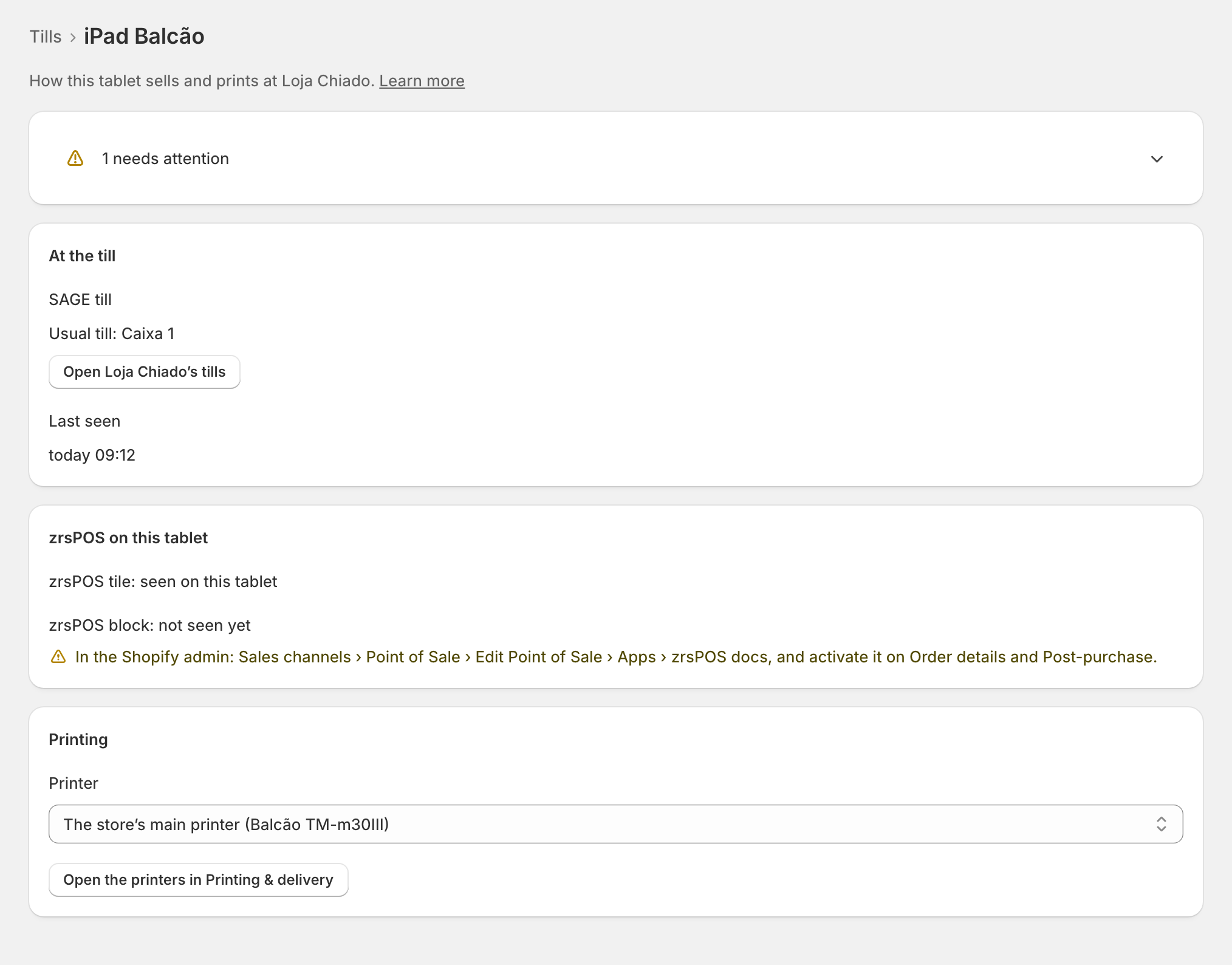
A tablet is Working when its zrsPOS tile and its zrsPOS block have both been seen.
When the tile or the block is missing
- zrsPOS tile: not seen yet: "Add the tile in this tablet’s Shopify POS; this page updates once it opens." See The zrsPOS tiles.
- zrsPOS block: not seen yet: switch it on in the Shopify admin's POS editor, once for the shop. See Set up Shopify POS for zrsPOS.
Each has its page: The zrsPOS tile is missing on the tablet and The zrsPOS block is missing on the tablet.
Edge cases
- "Print nothing on …?": choosing no printer on a live shop asks first. "Its sales print no receipt from the next sale. Customers can still get their document by e-mail."
- A read-only plan still lets you change a tablet's printer, so the tills keep printing.
- "This store’s printers could not be read." The printer field waits; the rest of the page shows.
- A tablet moved to another store shows under the store where it sells now.
- A tablet not seen for 30 days leaves the list. It comes back the next time it opens a zrsPOS tile.
- Staff on the tablet never see technical text: a plain sentence and a code to give the manager. See Selling problems.
- A tablet's usual till is set on the store's Tills and tablets page, never here. See Several SAGE tills at a store.
- The print app on an Android tablet pairs with a printer, not with zrsPOS: see The print app.
More in Stores & tills
- The Stores page
- Does a store sell at a till?
- Every location needs its own setup
- Pause a store
- Choose a store's série
- The documents a store issues
- A store's SAGE records
- VAT zone and time zone
- Float and closes to SAGE
- A store's SAGE till
- Several SAGE tills at a store
- New till in SAGE
- SAGE tills
- Set up Shopify POS for zrsPOS
- The till through the day
- When a store needs attention