 zrsPOS
The documents a store issues
The document types a store issues - simplified invoice, invoice-receipt, returns document, returns série, debit note - and what a sale without a NIF gets, up to the simplified-invoice limit.
On the store's Documents & SAGE codes, once its série is chosen, Documents and Sales without a NIF say which SAGE document types it issues.
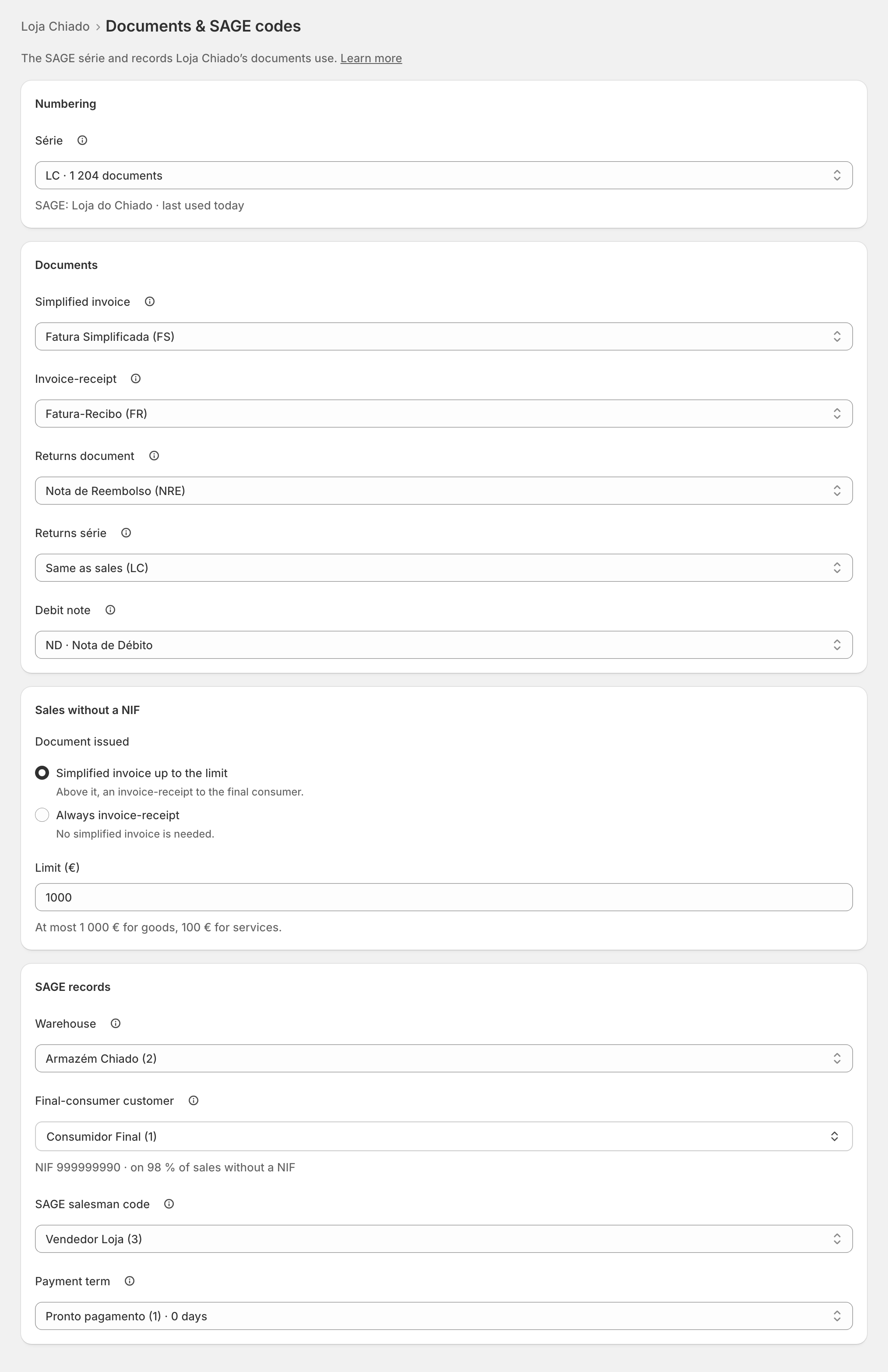
Documents
- Simplified invoice: "Issued for a sale without a NIF, up to the limit below."
- Invoice-receipt: "Issued for a sale with a NIF, and above the limit."
- Returns document: "Returns and refunds. Your accountant says which one: credit note or refund note."
- Returns série: "Only when your SAGE numbers this store’s returns in a série of their own." Otherwise leave it on Same as sales (…).
- Debit note: when a sale was invoiced for less than Shopify charged, the correction you issue from Till close › Differences is this document, in the store's série. With "None: an invoice instead", that correction is an invoice-receipt or simplified invoice, by a sale's rules. See Differences.
Each list holds only the types your SAGE has for the série. zrsPOS never creates a document type.
Sales without a NIF
Document issued:
- Simplified invoice up to the limit: "Above it, an invoice-receipt to the final consumer."
- Always invoice-receipt: "No simplified invoice is needed." The limit field goes away.
Limit (€): "At most 1 000 € for goods, 100 € for services." Type it the Portuguese way, with a comma: 999,50. It must be between 0,01 € and 1 000 €.
A sale with a NIF always gets an invoice-receipt. How the till asks for the NIF: The customer's NIF.
Edge cases
- A service on the sale: a simplified invoice that carries a service may total at most €100, whatever the store's limit. Above it, zrsPOS issues an invoice-receipt to the final consumer by itself. See Custom-sale items.
- A type your SAGE does not have: "FSX is not in your SAGE: these sales wait. zrsPOS never creates document types." Open the page for your SAGE partner lists it for the série. See Document type not found in SAGE.
- A new returns série must be communicated to the AT before its first return, or SAGE refuses every credit note. Meanwhile, put Returns série back on Same as sales. See Register a série with the AT.
- Credit note or refund note: changing it applies from the next return; documents issued stay as they are.
- "Between 0,01 € and 1 000 €." Save lands on the limit until it is right.
- Store credit as a voucher must pay the returns document type each store issues. See Store credit as a voucher.
- Saving on a live shop lists each change first: "From the next sale, … uses … Documents already issued stay as they are."
More in Stores & tills
- The Stores page
- Does a store sell at a till?
- Every location needs its own setup
- Pause a store
- Choose a store's série
- A store's SAGE records
- VAT zone and time zone
- Float and closes to SAGE
- A store's SAGE till
- Several SAGE tills at a store
- New till in SAGE
- SAGE tills
- The store's tablets
- Set up Shopify POS for zrsPOS
- The till through the day
- When a store needs attention