 zrsPOS
Change SAGE company
When the address or key leads to another SAGE company, zrsPOS asks first; issuing pauses until Stores, SAGE items and Payments are confirmed for the new company. And disconnecting SAGE.
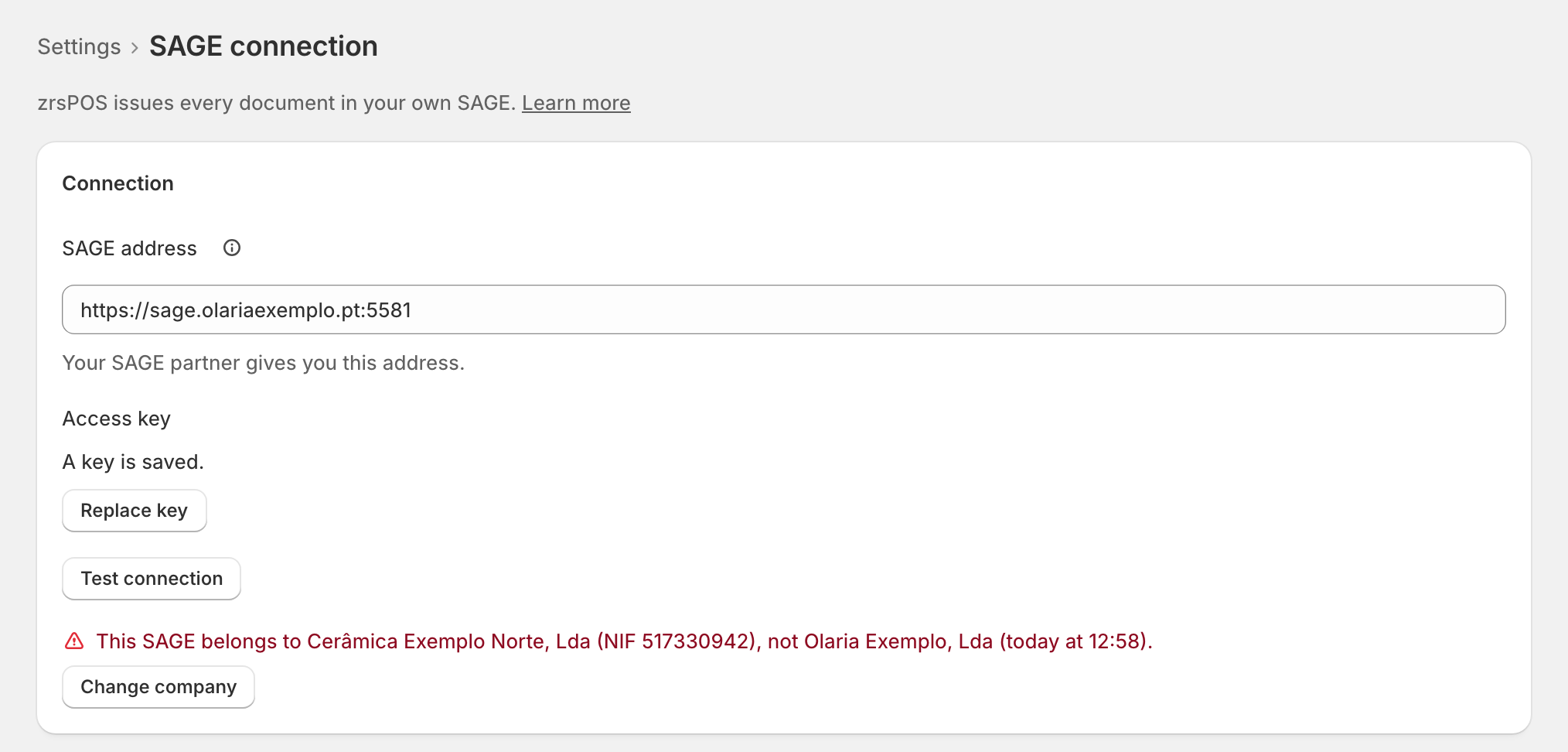
A key belongs to one SAGE company. If a new address or key leads to another company (another NIF), zrsPOS never switches by itself.
How the change goes
- Test connection finds the other company and says "This SAGE belongs to … (NIF …), not … (…)." with Change company. A Save that finds it asks at once.
- The confirm names both companies: "Change to … (NIF …)?" and "Issuing pauses until you confirm Stores, SAGE items and Payments. Issued documents stay with … (NIF …)."
- Press Change company. Issuing pauses before anything is saved; then the new connection is saved, and the items and lists read from the old company are forgotten.
Confirm the three pages
SAGE connection then shows Issuing is paused: "Confirm the three below, then start issuing again." Under After the company change: "… → … · … · by … Check each one and confirm it on its page."
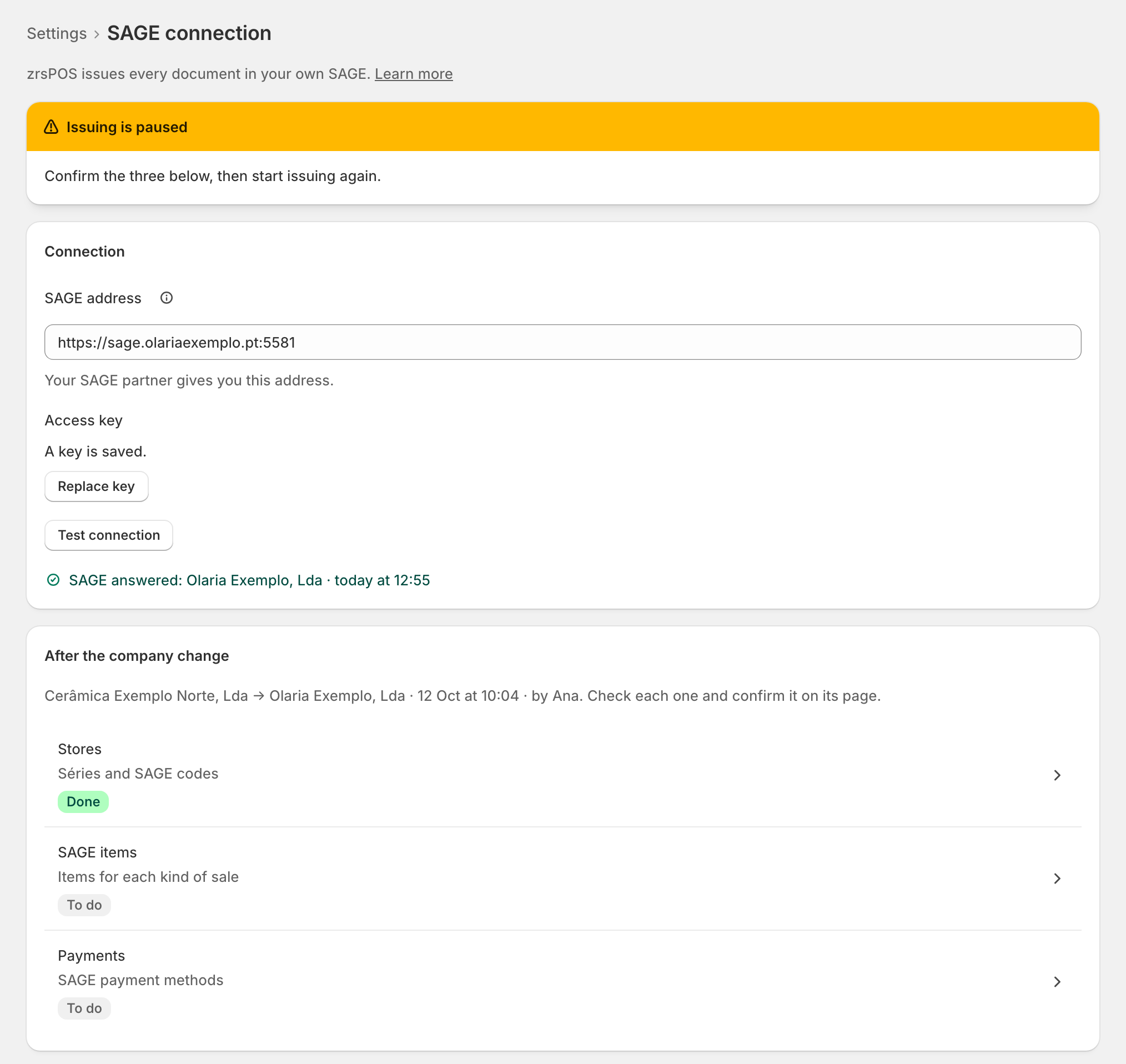
- Stores (séries and SAGE codes);
- SAGE items: Confirm SAGE items for …. Each item is checked against the new company's SAGE;
- Payments: Confirm Payments for …. Each payment method marked must be fixed first ("Fix … first.").
Each page is confirmed on its own. Issuing resumes once all three are confirmed.
Disconnect SAGE
In the Danger zone of SAGE connection: "zrsPOS stops issuing until you connect SAGE again." Confirm with Disconnect SAGE: "Sales go on and wait for their document until you reconnect. Issued documents stay in SAGE." The saved key is dropped.
Edge cases
- Not live yet: nothing pauses. The confirm says "Then confirm Stores, SAGE items and Payments again."
- Documents already issued keep the company that issued them. A document's page shows the previous company's documents from the copy zrsPOS keeps.
- The change can't finish: issuing stays paused and the new connection is not saved. Try again, or write to support@zrspos.com.
- A confirm is refused while its page still has a problem: "Not confirmed yet: a payment method above still needs attention."
- Barcodes are not checked for the new company yet: check them again on SAGE items › Barcodes.
- Document design flags each line and the logo saved for the old company: see Your company on documents.
- Two companies with no NIF read are never taken as different: zrsPOS compares NIFs only when both are known.
More in SAGE
- SAGE and your SAGE partner
- Put SAGE on the internet
- Connect zrsPOS to your SAGE
- Test the connection
- When the connection test fails
- SAGE functions and licence
- Your company and the lists read from SAGE
- Register a série with the AT
- Repair a numbering chain
- SAGE items
- Custom-sale items
- Island VAT items
- Refund and shipping items
- Barcodes
- Payment methods
- Default SAGE payment method and what counts as cash
- Store credit as a voucher: a voucher for each store
- Payments on returns and online orders