 zrsPOS
A store's SAGE records
A store's SAGE records - warehouse, final-consumer customer, SAGE salesman code and payment term - picked from your SAGE, and created there for you when a payment term or salesman is missing.
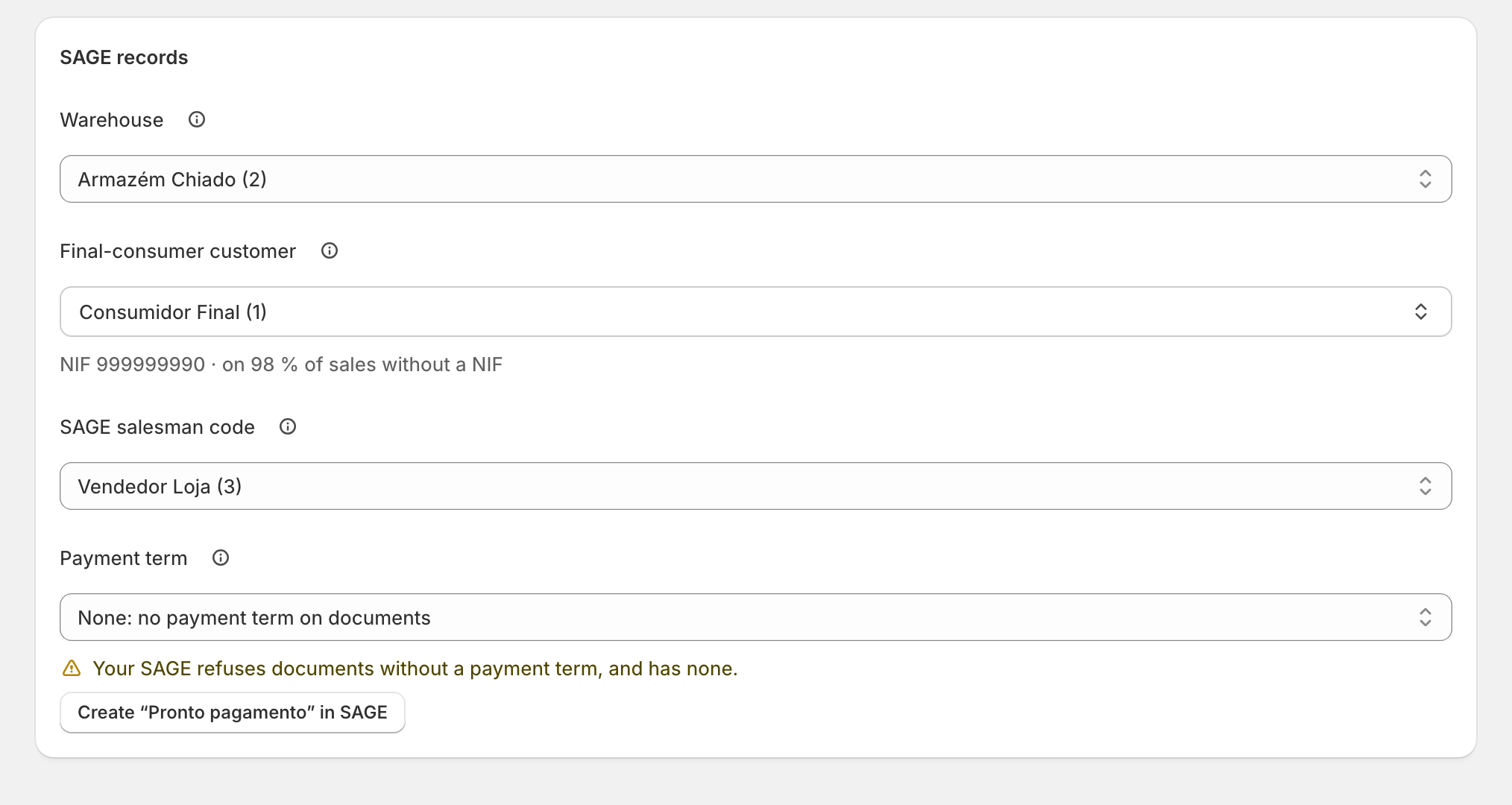
The last card of the store's Documents & SAGE codes, SAGE records, holds what each document carries in SAGE. Every value is picked from your SAGE, never typed.
The four records
- Warehouse: "Stock of each sale leaves this SAGE warehouse."
- Final-consumer customer: "The SAGE customer on a sale with no NIF. Usually Consumidor Final." The search first suggests "Customers with NIF 999999990".
- SAGE salesman code: "Optional. Used when the salesperson has no SAGE salesman code. Only active ones are listed." With "None: each salesperson’s own code", only each person's code is used. Who carries which code: Salespeople.
- Payment term: "Optional. Sent with each document when your SAGE asks for one." "None: no payment term on documents" is a valid choice.
Create a missing record in SAGE
When your SAGE has no payment term, or no active salesman, that zrsPOS could use, the field says so and offers to create one:
- Press Create “…” in SAGE, for example Create “Pronto pagamento” in SAGE.
- Confirm. For a payment term: "A payment term of 0 days. zrsPOS reads it back, then saves it for this store."
- The field shows each part as it goes: checking SAGE, creating in SAGE, reading back from SAGE.
- "Created in SAGE as …, read back and saved for …"
Only a payment term and a salesman are ever created this way. A warehouse or a customer comes from your SAGE.
Edge cases
- "SAGE did not create it, so nothing was saved." The cause shows at the field, with the page for your SAGE partner: usually the zrsPOS user's rights in SAGE.
- An inactive salesman: "… is inactive in SAGE, and SAGE refuses it on a document." Pick an active one. See The store’s SAGE salesman code is not usable.
- A salesman gone from SAGE: "SAGE salesman code … is not in your SAGE: sales without a code of their own wait."
- A payment term gone from SAGE: "Payment term … is not in your SAGE, so SAGE refuses these documents." See The store’s payment term is not in SAGE.
- A customer gone from SAGE: "SAGE has no customer …, so sales without a NIF would wait." Choose the final consumer again.
- "SAGE’s lists could not be read": "The saved values still apply; other choices are missing." See what SAGE could not read opens the lists.
- Saving checks SAGE first: a value SAGE no longer has is refused at its field, and nothing is saved.
- The store's salesman code is a fallback: a salesperson with a code of their own always puts that code on the document.
More in Stores & tills
- The Stores page
- Does a store sell at a till?
- Every location needs its own setup
- Pause a store
- Choose a store's série
- The documents a store issues
- VAT zone and time zone
- Float and closes to SAGE
- A store's SAGE till
- Several SAGE tills at a store
- New till in SAGE
- SAGE tills
- The store's tablets
- Set up Shopify POS for zrsPOS
- The till through the day
- When a store needs attention