 zrsPOS
Custom-sale items
A custom sale (a line typed at the till, with no product) is invoiced on a generic SAGE item for its VAT rate. Setting them all up at once, the VAT-exempt item's exemption, and the €100 limit of a simplified invoice with a service.
A POS custom sale has no product and no barcode. zrsPOS invoices it on a generic SAGE item for its VAT rate, with the cashier's text as the line's description. Settings › SAGE items › Custom sales: "A sale with no product needs one SAGE item per VAT rate."
On the mainland the rates are 23 %, 13 %, 6 % and VAT exempt. Island stores have their own: see Island VAT items.
Set them all up at once
Each row says what is chosen, or what zrsPOS proposes: "Nothing chosen: zrsPOS proposes …" (one it creates) or "Nothing chosen: zrsPOS proposes your … (…)" (one of yours).
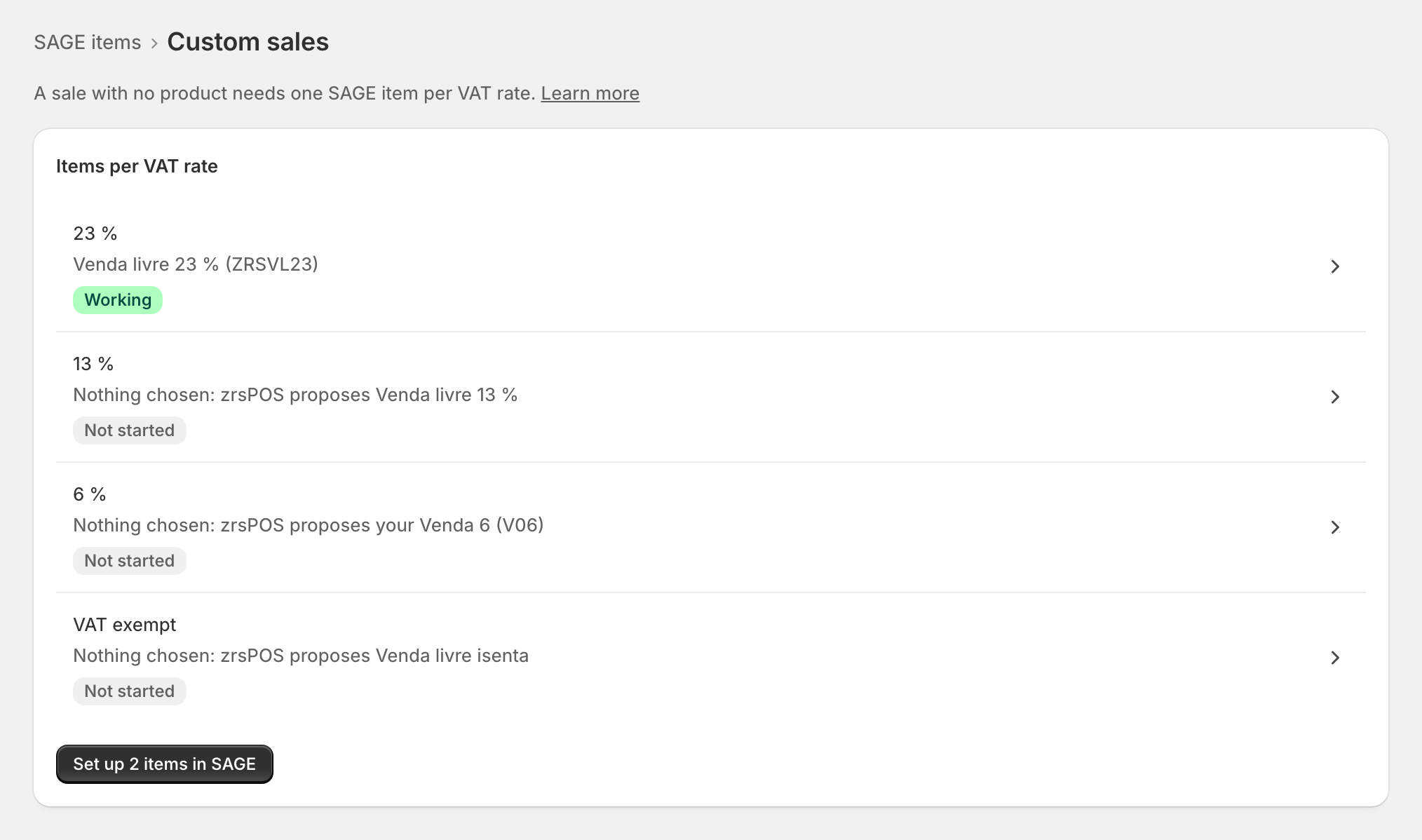
- Press Set up … items in SAGE.
- The confirm lists each item with a tick: "zrsPOS creates new items without stock, uses yours as they are, then checks each one in SAGE. Untick any you’d rather choose yourself."
- Press Set up in SAGE. The page ends with "Done, and checked in SAGE: …" or names the one that was not created and why, with Try again.
Or open one rate and choose its item yourself.
The VAT-exempt item
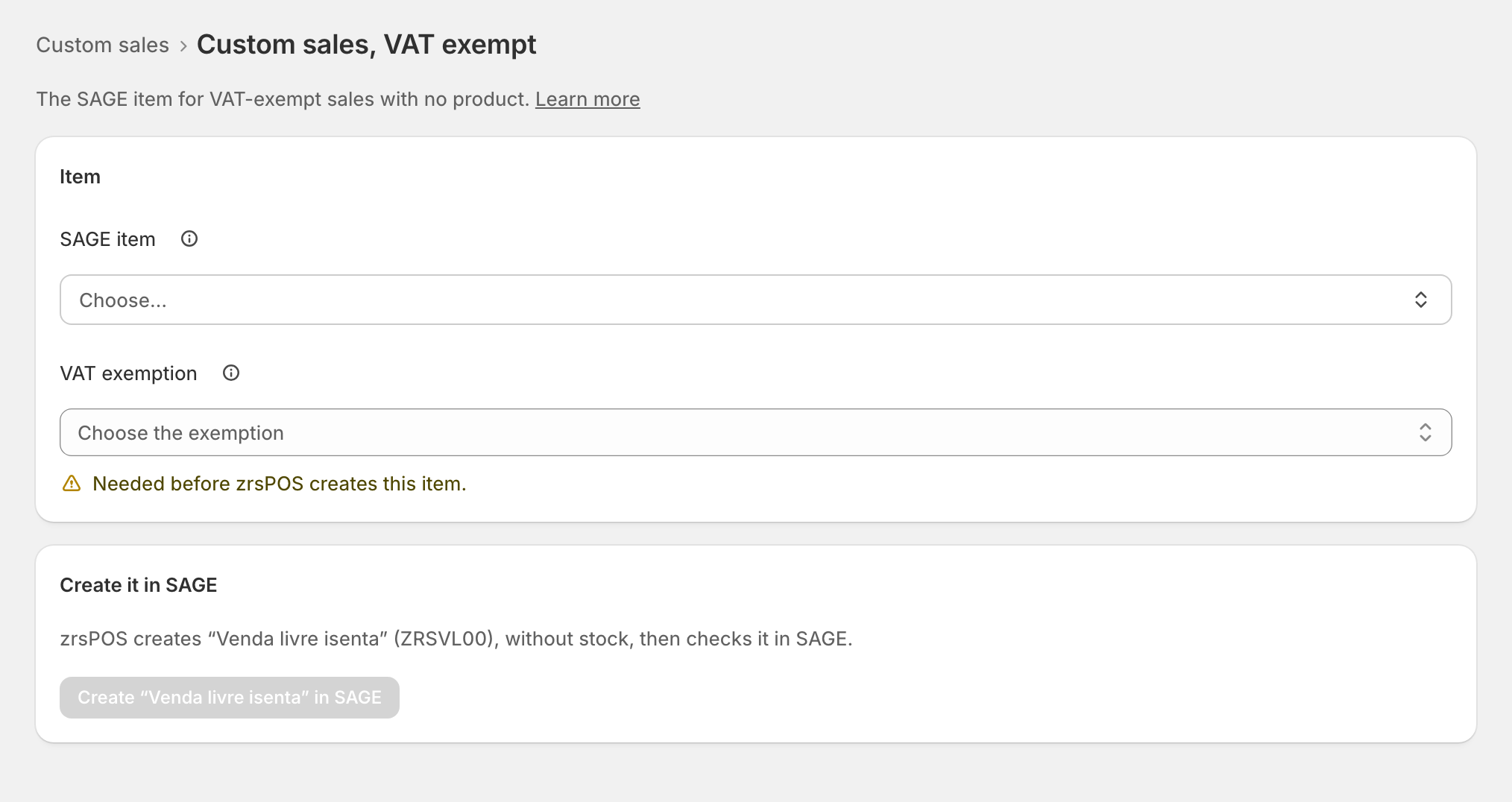
It needs its VAT exemption: "Your accountant decides it. Only the codes your SAGE accepts on a document are listed." zrsPOS creates this item only once the exemption is chosen ("Needed before zrsPOS creates this item.").
Edge cases
- A sale at a rate with no item waits in Documents without a document: "None chosen: custom sales at … % wait without a document." Choose the item, then press Try again on the sale. See Custom-sale item is missing.
- The €100 limit with a service: the items zrsPOS creates are services in SAGE. A simplified invoice that carries a service may total at most €100, so a sale without a NIF with a custom-sale line above that is issued as an invoice-receipt to the final consumer instead. Nothing to do.
- "Your SAGE has no … % VAT rate that documents accept." Ask your SAGE partner to add it, or choose your own item.
- "Every code zrsPOS uses for this item is taken in your SAGE. Choose your own item."
- "SAGE refuses …’s exemption (… / …) on a document." The item's VAT group is wrong in SAGE: ask your SAGE partner, or choose another item.
- An item you chose turned out to track stock or carry the wrong VAT: the row needs attention, and the confirm offers to replace it ("Replaces …, which tracks stock").
- On a live shop a change asks first: "Sales from now on are invoiced with … (…)."
- "SAGE changed since you looked. Nothing was written: the rows above show it now." Someone changed an item meanwhile: check the rows and set up again.
More in SAGE
- SAGE and your SAGE partner
- Put SAGE on the internet
- Connect zrsPOS to your SAGE
- Test the connection
- When the connection test fails
- SAGE functions and licence
- Your company and the lists read from SAGE
- Change SAGE company
- Register a série with the AT
- Repair a numbering chain
- SAGE items
- Island VAT items
- Refund and shipping items
- Barcodes
- Payment methods
- Default SAGE payment method and what counts as cash
- Store credit as a voucher: a voucher for each store
- Payments on returns and online orders