 zrsPOS
An Epson that fetches receipts
Set up an Epson network printer with Server Direct Print so it fetches its receipts from zrsPOS by itself.
Some Epson network printers (TM-m30III, TM-T88 and others) have Server Direct Print: the printer itself asks zrsPOS for receipts every few seconds. No PrintBox, no tablet app, nothing changed on the router.
In zrsPOS
- In Settings › Printing & delivery › Printers, press Add printer.
- Choose An Epson that fetches receipts and press Next.
- Choose the store and a name, and press Next. The printer is saved, and the page shows its Server URL and Printer ID, each with a Copy button.
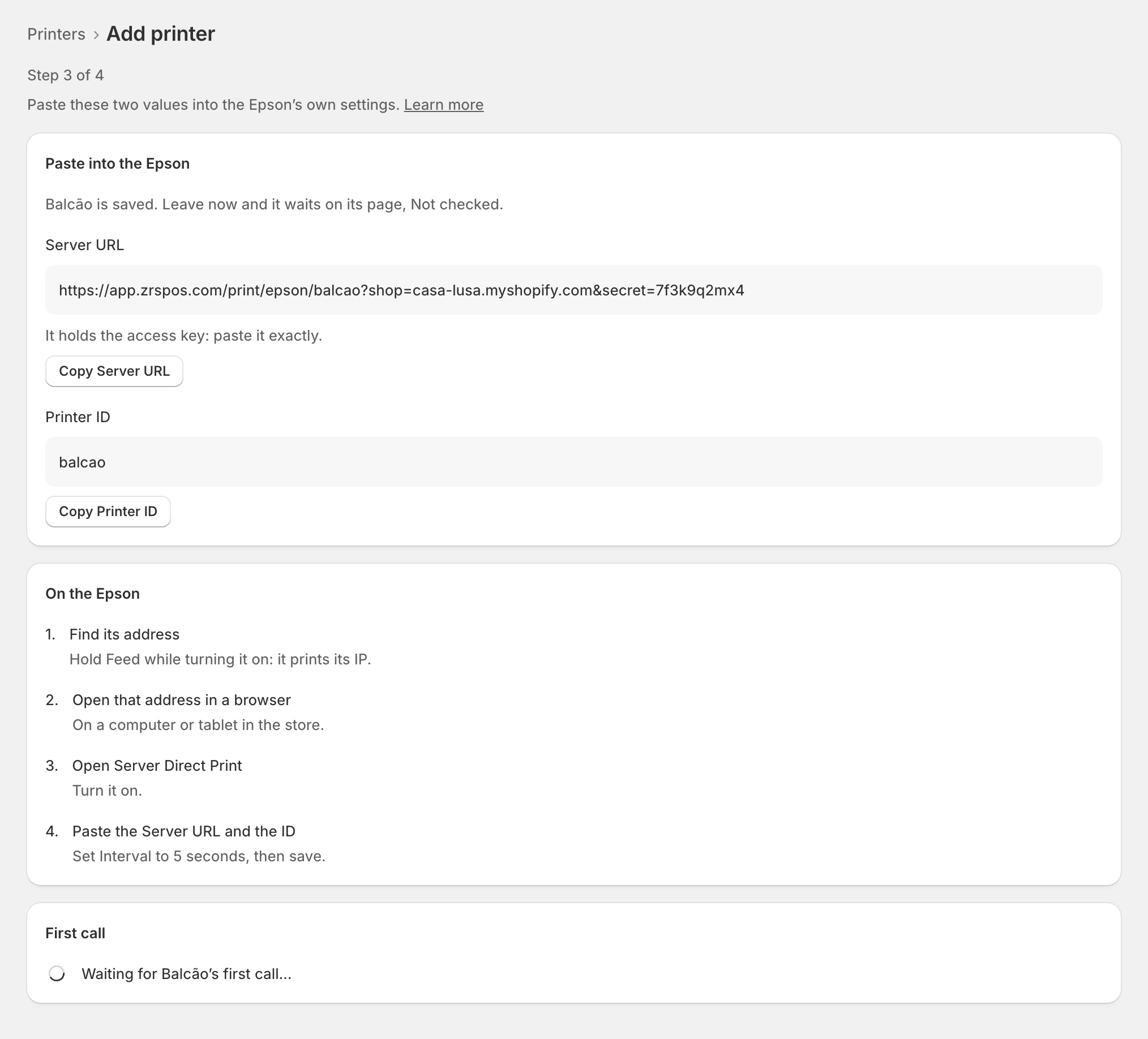
Keep that page open in one tab; you copy from it.
On the Epson
Do this on a computer or tablet on the same network as the printer.
- Switch the printer off, then on again while holding Feed. It prints a slip with its IP address, for example
192.168.1.180. - Open that address in a browser:
http://192.168.1.180/in the example. If it asks for a login, the user isepsonand the password is on the printer's label (older models:epson). - Find Server Direct Print in the menu (on some models it sits inside ePOS-Print) and set it to Enable.
- Paste the Server URL whole, from
https://to the end, and the Printer ID exactly, with no spaces before or after. - Set Interval to 5 seconds, send the settings, and Reset or Restart the printer if it asks.
Back in zrsPOS, the page shows the printer's first call within seconds. Press Next: test print and print a test.
Edge cases
- No call after 10 minutes: the page says so. Check the URL and ID match exactly, and that the Epson is online.
- A longer Interval means receipts come out later. 5 seconds is the setting to use.
- No Server Direct Print on your model: look for an Epson firmware update, or plug the printer into a PrintBox by USB.
- You leave before the first call: the printer stays saved and waits on its page, Not checked.
- The Epson calls with an old URL: its page says so and shows the URL to paste. This happens when the printer was deleted in zrsPOS and added again: the URL and ID change, and must be pasted again.
- Delete it in zrsPOS: its waiting receipts are dropped, and the Epson needs a new URL to come back.
- An Epson with a Wi-Fi dongle: with the dongle in, its network port is off. Use one or the other.
More in Printing
- Choose how to print
- Who prints?
- Set up a PrintBox
- The PrintBox's status page
- Swap or add a printer on a PrintBox
- Move, unlink or reset a PrintBox
- Set up the print app
- Printers the print app can use
- USB printers and the print app
- Keep the print app running
- Add a printer
- A printer's page
- Printers and their status
- Receipts by e-mail
- Gift receipts
- Nothing prints: what to check