 zrsPOS
Move, unlink or reset a PrintBox
Move a PrintBox and its printers to another store, unlink it from your shop, or reset it to how it came.
A PrintBox prints for one store at a time. Moving it takes its printers along; unlinking stops it until it gets a new code.
Move it to another store
On the box's status page, at the bottom, under Move to another store, or unlink, press Unlink this PrintBox and confirm. The box stops printing.
In zrsPOS, make a code for the new store: Settings › Printing & delivery › Printers, press Add printer, choose zrsPOS PrintBox or print app, choose the new store and press Next: pairing code.
At the new store, plug the box in and connect it to the internet there (the cable, or Change Wi-Fi).
Open the box's page. It says Not linked to a shop.
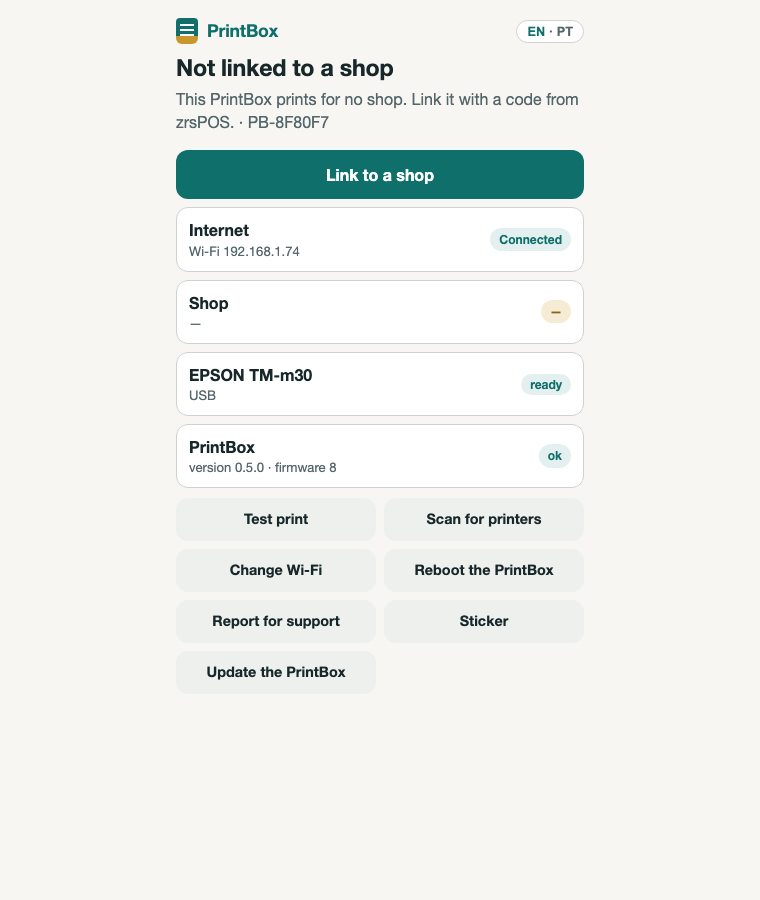
Press Link to a shop: the page walks through anything missing, then asks for the code. The shop is already filled in; type the code and press Pair.
Its printers move to the new store with their history. Receipts still waiting for the old store are dropped, and the old store's tablets that used them print on that store's main printer.
Unlink it
The same button, Unlink this PrintBox. The box stops printing until it is linked again with a new code, at this store or another. zrsPOS is told, so the store's tablets stop sending to its printers and print on the store's main printer.
You can also unpair it from zrsPOS: on the printer's page, the unpair button signs the box out for good. See A printer's page.
Reset it to how it came
Hold the reset button for ten seconds. The box forgets its password, its Wi-Fi and its shop; the zrsPOS software stays inside. Set it up again from the first step, with a new code: Set up a PrintBox. It takes about five minutes.
Edge cases
- While it is unlinked, its printers show PrintBox unlinked in zrsPOS. When you link it again, the screen that waits for the box lists the printers it took back.
- Unlinked while offline: the box says zrsPOS does not know yet and tells zrsPOS as soon as it has internet. Until then, receipts for its printers wait in zrsPOS.
- A mistyped code never unlinks anything: when moving to another shop, the old shop is told the box left only once the new code worked.
- A printer you set not in use stays off after the move.
- A printer the box no longer has when it is linked again stays behind, off.
- Paired again at the same shop after a reset: zrsPOS knows the box by its serial number and gives it its printers back.
- The new store has no other printer: the moved printer becomes its main printer.
- The old store is left with no printer: its tablets print nothing until you add one.
More in Printing
- Choose how to print
- Who prints?
- Set up a PrintBox
- The PrintBox's status page
- Swap or add a printer on a PrintBox
- Set up the print app
- Printers the print app can use
- USB printers and the print app
- Keep the print app running
- An Epson that fetches receipts
- Add a printer
- A printer's page
- Printers and their status
- Receipts by e-mail
- Gift receipts
- Nothing prints: what to check