 zrsPOS
Gift receipts
The closing words printed on a gift receipt, the receipt without prices staff print for a present.
A gift receipt is a receipt without prices that staff print from the POS order, for a present. It is not a fiscal document. You set the words it ends with in Settings › Printing & delivery › Gift receipt.
The closing words
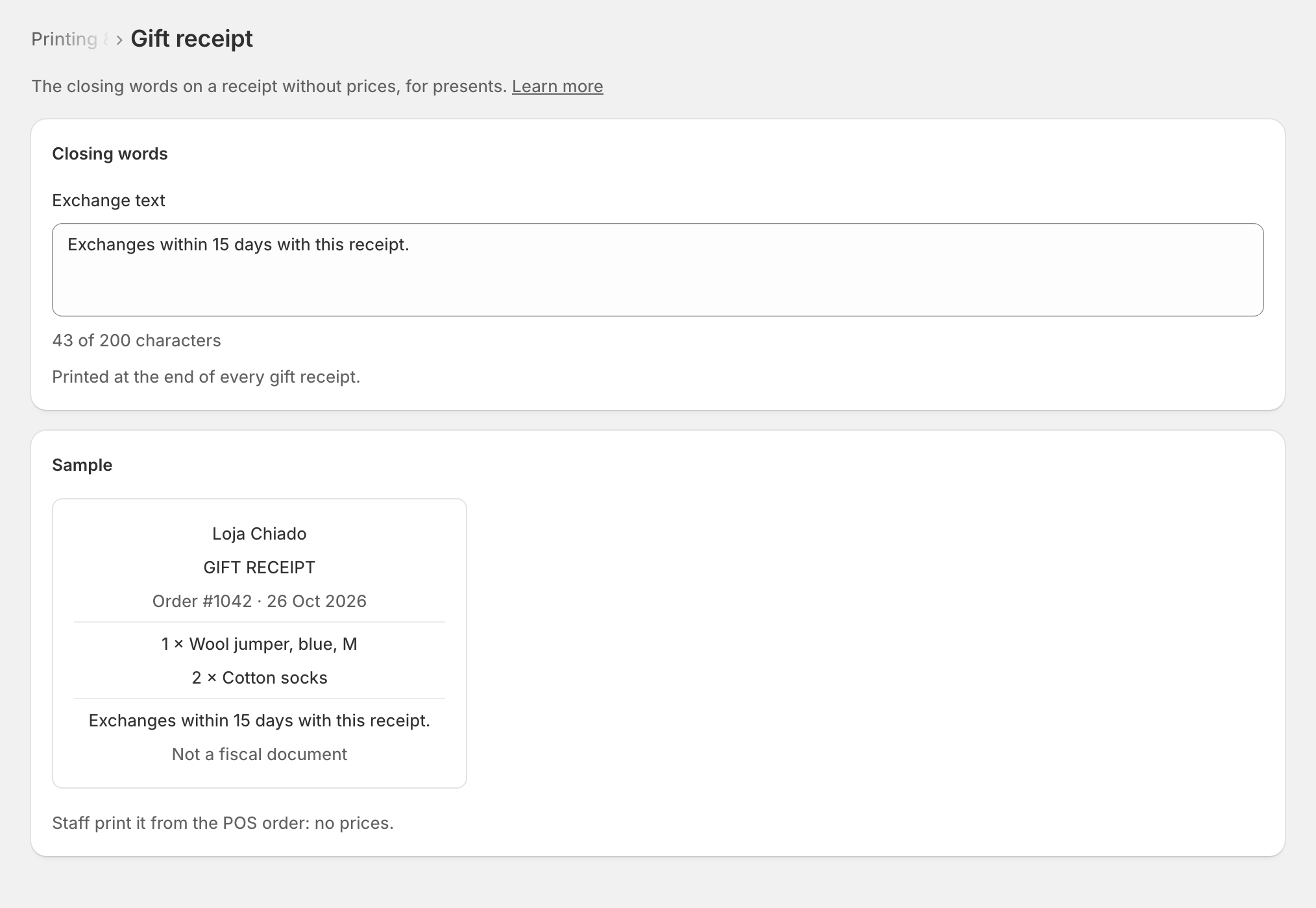
- Type the text under Exchange text: for example, how long the customer has to exchange.
- The sample slip on the page shows how it reads.
- Save.
Left empty, the receipt prints the default text, shown on the page: "Exchanges with this receipt, within our exchange period."
Edge cases
- At most 200 characters. A longer text cannot be saved: shorten it.
- zrsPOS prints nothing (you print from SAGE, or e-mail only): gift receipts do not print. Your text is kept and prints again once zrsPOS prints.
- A read-only plan: you can look at the text, but not change it.
More in Printing
- Choose how to print
- Who prints?
- Set up a PrintBox
- The PrintBox's status page
- Swap or add a printer on a PrintBox
- Move, unlink or reset a PrintBox
- Set up the print app
- Printers the print app can use
- USB printers and the print app
- Keep the print app running
- An Epson that fetches receipts
- Add a printer
- A printer's page
- Printers and their status
- Receipts by e-mail
- Nothing prints: what to check