 zrsPOS
SAGE and your SAGE partner
zrsPOS issues every document in your own SAGE 50c. What it needs from SAGE, the four settings pages that set it up, and the page you send your SAGE partner.
zrsPOS issues every document in your own SAGE 50c, through SAGE's SmartAPI. SAGE is the certified issuer: it numbers each document, signs it and keeps it. zrsPOS never stores a document SAGE did not issue.
What you set up, in this order
- Settings › SAGE connection: the SmartAPI address and its access key. zrsPOS reads your company, its NIF and the functions your licence has. See Connect zrsPOS to your SAGE.
- Settings › Stores: each store's série and SAGE records. Séries are registered with the AT in SAGE: see Register a série with the AT.
- Settings › SAGE items: the items a sale needs besides your products. See SAGE items.
- Settings › Payments: the SAGE payment method each way of paying is booked on. See Payment methods.
Nothing is written to SAGE without your confirmation, and everything zrsPOS creates there is read back before it counts.
For your SAGE partner
Your SAGE partner (the company that installed and maintains your SAGE) prepares a few things only they can do. In Settings › SAGE connection, open For your SAGE partner: "Send this to your SAGE partner: it lists what they prepare."
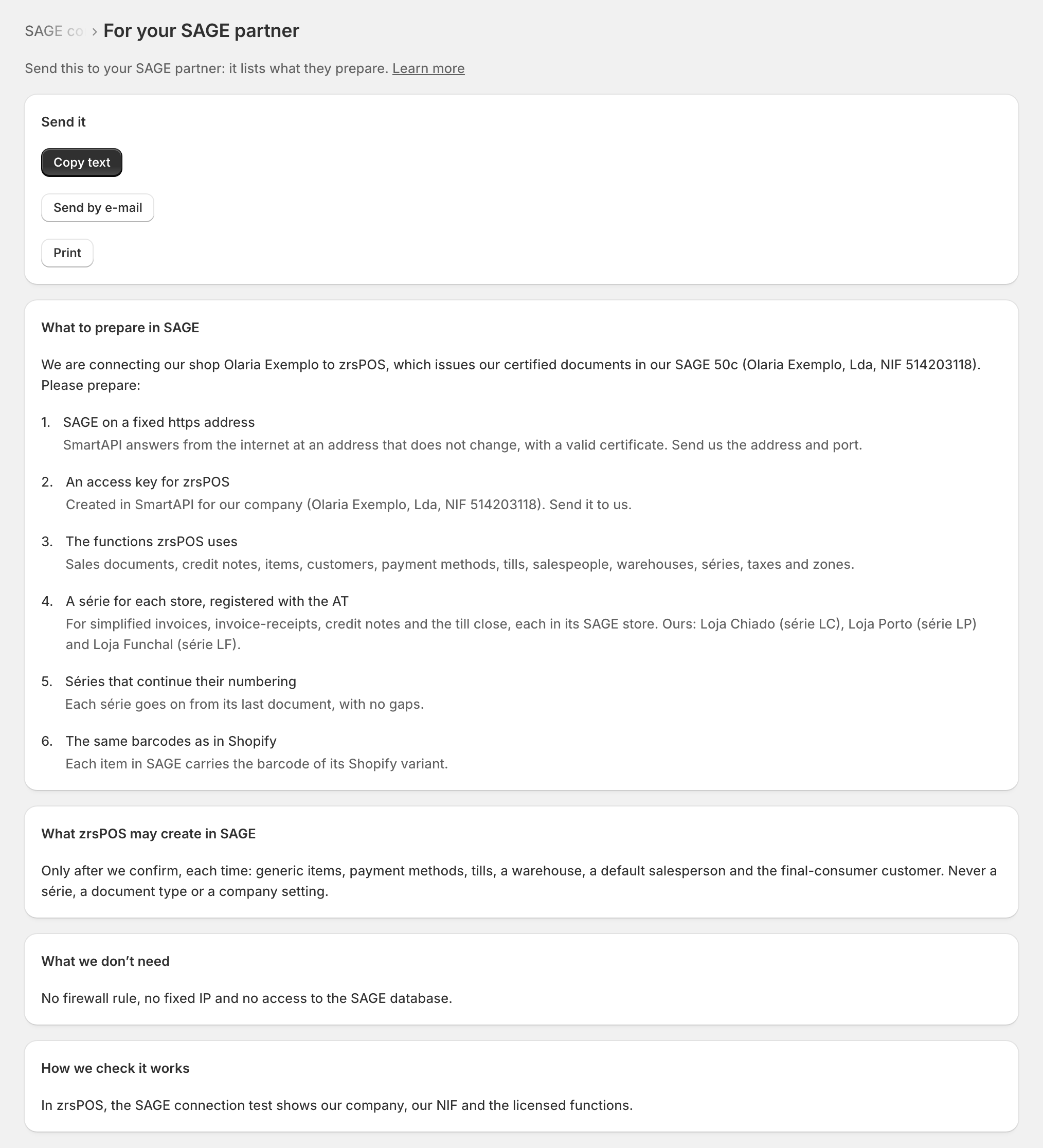
The letter is written in your name, with your shop, your company and its NIF. Under What to prepare in SAGE it lists:
- SAGE on a fixed https address, and An access key for zrsPOS;
- The functions zrsPOS uses: when your licence lacks some, it names them;
- A série for each store, registered with the AT, naming your stores' séries once they are set;
- Séries that continue their numbering, and The same barcodes as in Shopify.
More items appear when you need them: a voucher payment method for store credit, permission to create payment methods, the document types of a série, Tax Free's exempt VAT group, rights for the zrsPOS user.
It also says What zrsPOS may create in SAGE ("Only after we confirm, each time: …"), What we don't need ("No firewall rule, no fixed IP and no access to the SAGE database.") and How we check it works.
Send it with Copy text, Send by e-mail or Print.
Edge cases
- Opened from a problem (a missing function, a série without document types), the page lands on the item that problem needs.
- "Could not copy. Select the text below and copy it by hand." The browser refused the copy: select the letter yourself.
- Before SAGE is connected the letter names no company; once the connection test has read it, it does.
- New items in the letter do not mean something broke: they are added as you switch features on (store credit, Tax Free) or as a store's séries are set.
- zrsPOS never creates a série, a document type or a company setting in SAGE: those are always your partner's. What it may create (generic items, payment methods, tills, a warehouse, a default salesperson, the final-consumer customer) it creates only after you confirm.
More in SAGE
- Put SAGE on the internet
- Connect zrsPOS to your SAGE
- Test the connection
- When the connection test fails
- SAGE functions and licence
- Your company and the lists read from SAGE
- Change SAGE company
- Register a série with the AT
- Repair a numbering chain
- SAGE items
- Custom-sale items
- Island VAT items
- Refund and shipping items
- Barcodes
- Payment methods
- Default SAGE payment method and what counts as cash
- Store credit as a voucher: a voucher for each store
- Payments on returns and online orders