 zrsPOS
Island VAT items
Stores in Madeira and the Azores sell at their own VAT rates, so their custom sales need their own SAGE items. How zrsPOS knows a store is on an island, and how it checks the island rate.
A store in Madeira sells at 22 %, 12 % and 5 %; in the Azores at 16 %, 9 % and 4 %. Its custom sales need items at those rates: "Island stores sell at island VAT rates, so they use their own items."
Choose them
zrsPOS knows a store is on an island by its time zone or by its Shopify address. Then Settings › SAGE items › Custom sales shows Show the rates for, with Mainland, Madeira and Azores, each with its stores and its state ("All working", "1 needs attention"), and the list shows that region's rates.
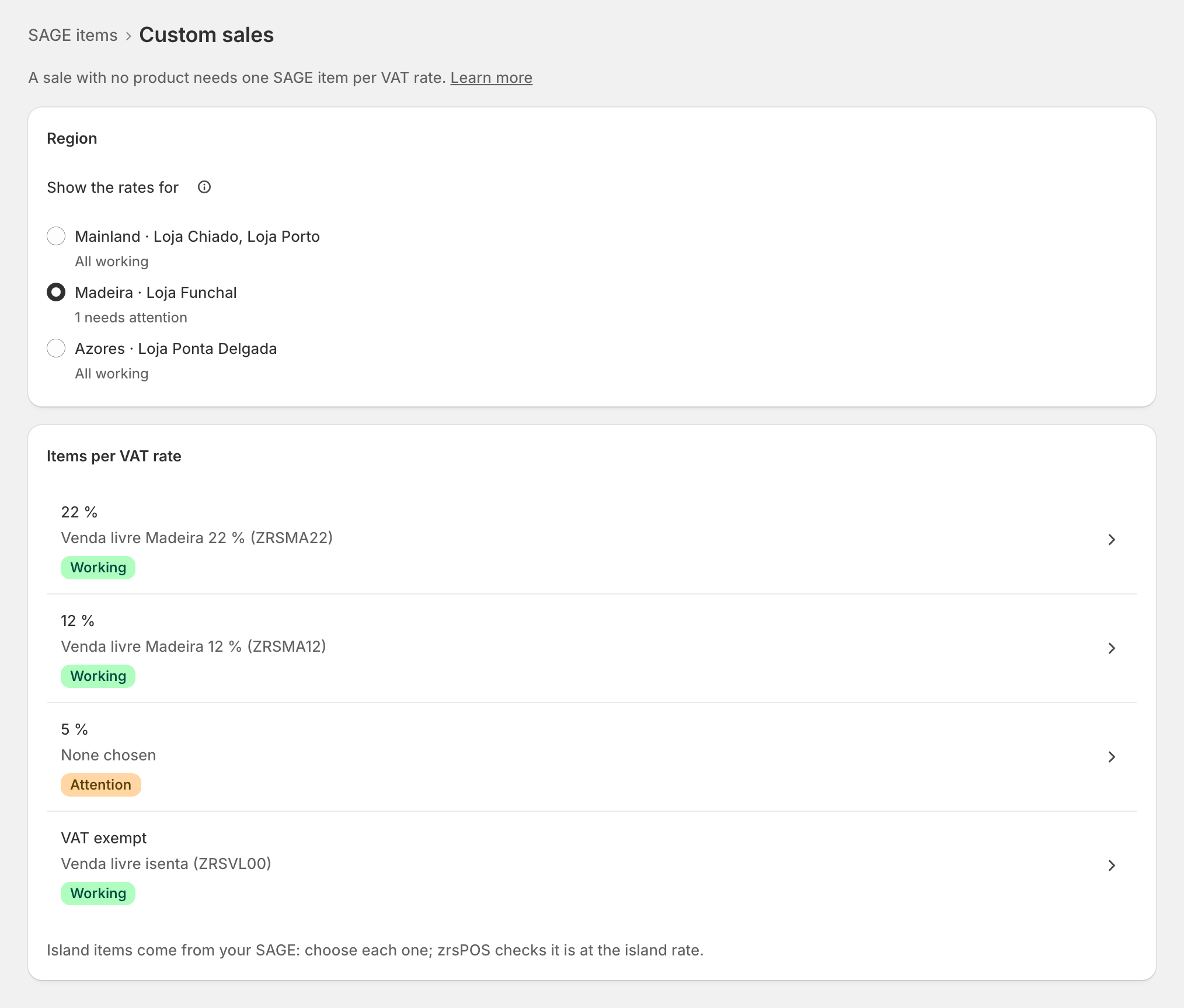
"Island items come from your SAGE: choose each one; zrsPOS checks it is at the island rate." zrsPOS does not create island items.
- Pick the region.
- Open each rate and choose its item in the SAGE item field.
- Save: zrsPOS reads the item in SAGE and checks that it really charges the island rate on a document.
The VAT-exempt item is shared with the mainland.
How SAGE charges an island rate
SAGE charges every document line through the VAT group's mainland line, whatever the store's region. So an island item needs a VAT group whose mainland line carries the island rate too (and whose island line has the same rate). An item on a normal group would charge the mainland rate, so zrsPOS shows it as wrong VAT, with the rate it has and the rate it needs: "… is at … % VAT in SAGE; this item must be at … %." Ask your SAGE partner for the right group.
Each island store's documents also carry the store's own VAT zone, set on its page in Settings › Stores.
Edge cases
- "None chosen: sales at … % in … wait without a document." Until the item is chosen, those island sales wait. Choose it, then press Try again on each in Documents.
- "… (found by its address)": the store was placed on an island by its Shopify address, not its time zone. Check the address if that is wrong.
- SAGE's VAT rules could not be read: the island rate can't be checked ("island VAT is not checked" on Lists read from SAGE). Read the lists again.
- A store with no island rates sold yet still needs them before going live: island stores are counted in "… of … working, islands included".
- Tax Free at an island store uses that region's rates too: see Tax Free.
More in SAGE
- SAGE and your SAGE partner
- Put SAGE on the internet
- Connect zrsPOS to your SAGE
- Test the connection
- When the connection test fails
- SAGE functions and licence
- Your company and the lists read from SAGE
- Change SAGE company
- Register a série with the AT
- Repair a numbering chain
- SAGE items
- Custom-sale items
- Refund and shipping items
- Barcodes
- Payment methods
- Default SAGE payment method and what counts as cash
- Store credit as a voucher: a voucher for each store
- Payments on returns and online orders